


-
- 1. 3Commas Trading Terminal Overview
- 2. 3commas Key Features
- 2.1. 3Commas crypto trading bots: how do they work?
- 2.2. Commas DCA Bot
- 2.2.1. How Does the 3Commas DCA Bot Work?
- 2.2.2. How to Setup 3commas DCA Bots?
- 2.2.3. How to Use 3commas DCA Bots in Your Trading Strategy?
- 2.3. 3commas TradingView Bot: Customize Your Trading Strategy
- 2.4. 3commas Grid Bot Options
- 2.4.1. How Does the 3Commas Grid Bot Work?
- 2.4.2. How to Use 3Commas Grid Bot in Your Strategy?
- 2.5. Options Bot: Hard Financial Instrument to Master
- 2.6. 3commas SmartTrade Terminal
- 2.7. 3commas Dynamic Trading Terminal
- 2.8. 3commas Backtesting Tool Overview
- 3. 3commas Crypto Trading Signals
- 3.1. Premium CQS Signals on 3commas
- 3.2. Personal 3commas Tradingview Signals
- 3.3. What is 3commas QFL Signals?
- 4. 3commas Exchanges List
- 5. Main 3commas Settings Review
- 6. 3commas Pricing: Is It Worth Your Money?
- 7. Is 3commas Safe to Use?
- 8. The Best 3commas Alternative
- 9. Conclusion
In this 3Commas review, we take a look at one of the most acclaimed cryptocurrency trading bot platforms available on the market. Here, you will learn what is 3Commas, important details of the 3Commas interface, and how to trade with 3Commas. Additionally, we will provide a 3Commas quick guide on how to use the 3Commas app and set up a 3Commas profitable trading strategy.
Let’s get this 3Commas review started with some basics about this crypto trading bot platform and some general info about the founding team behind it.
3Commas trading terminal overview
Yuriy Sorokin, Andres Susi, and Mikhail Goryunov founded the 3Commas platform in 2017 in Tallinn, Estonia. The goal was to provide traders with a platform for crypto trading bots that help them set up automatic trading.
Although they were facing some serious competition, the 3Commas automatic trading systems quickly became one of the community’s favorites. The team’s expertise in the niche allowed them to push out one of the best cryptocurrency trading bot experiences available.
In a nutshell, 3Commas trading bots save enormous amounts of time by allowing you to place hundreds of trades, which would be manually impossible. Additionally, because trades follow a predetermined strategy, the 3Commas bot profitability is more consistent than manual trading. This is because the 3Commas automated trading bot removes FUD and FOMO out of the equation, two major factors in many traders’ downfalls. To continue this 3Commas review, let’s go over its main features and explain in detail what are 3Commas bots.
3Commas features
The main component of the 3Commas automated cryptocurrency trading platform comes in the form of a web app found on 3Commas.io. This version provides the best 3commas crypto trading bot features. However, for those that wish to still monitor their 3Commas automated trading bots on the go, there’s also a mobile app for both iOS and Android.
So, to begin this 3Commas review, let’s check out the 3Commas trading bot features and see how they work.
3Commas crypto trading bots: how do they work?
3Commas automatic trading bots are, by far, the pivotal feature of this platform. They consist of three different types, including: DCA bots (dollar-cost average), a trading Grid bot, and a Signal bot. All of these require a different 3Commas bot configuration, which we will cover in detail further down this 3commas trading bot review.
In essence, the 3commas bot, regardless of its type, opens and closes trades automatically. But how do 3Commas bots choose to buy something? Simply put, the 3commas crypto trading bot will open trades once certain conditions set up by the user are met. When profits reach their target threshold, the bot will sell the assets and increase your portfolio value.
Many ask themselves – can you lose money with 3Commas bots? The answer is a resounding YES! Even the best crypto bot strategy isn’t flawless and you should always set up stop losses to reduce risks.
On that note, let’s continue this 3Commas review, by examining your options on how to use 3commas trading bots effectively.
3Commas DCA bot
The DCA bot is the most popular type of bot on the platform. As their name would suggest, DCA bots on 3Commas work by averaging the price when buying or selling cryptocurrencies on your behalf. You have two types of DCA bots at your disposal:
- A DCA Long bot will average down the price to bring you closer to a profit. It will help you close a position in the green even though the price didn’t reach your initial exit target.
- A DCA Short bot will accumulate more of the base crypto you are trading in case of a market downturn. It will help you increase your portfolio for when the market takes a more favorable turn and have more coins to sell at a higher price.
In either case, both types of bots reduce the average price of the crypto you are buying to provide you with an opportunity for profit.
3Commas DCA bot: how it works
To help you understand how the DCA bot works, let’s have an in-depth look at the 3Commas DCA long bot. The bot enters a trading position following a buy order (limit or market) and a take profit position when you wish to cash in.
If the market goes your way, the bot sells the assets at the required target and you pocket the difference, it’s as simple as that. However, this 3commas DCA bot strategy takes a whole other dimension when the market goes against you.
For instance, if the price moves under your initial purchase level, the bot will buy more assets, reducing the average price. At the same time, the take profit level is lowered to correspond to the new average purchase price. Consequently, the price doesn’t need to reach the initial take profit level, and making profits in a price range becomes much more feasible. Thus, even if the price never returns to the initial purchase levels, you still have a good chance of closing the trade with a profit in hand.
Let’s illustrate this with a quick example:
Imagine you enter a position at a price of $100, with a take profit of 20% above this price level ($120 to be exact). In the following days, the price fluctuates to 90, 80, 70, 90, and finally settles at 110. Without DCA, your take profit would remain at $120, and the trade would remain open.
With a DCA bot, the average price moves to $90 (100+90+80+70+90+110)/6=90). This allows you to get 20% at a lower take profit price point of $108 ($90+20%=108), allowing you to close the deal in the green, even though the $120 level hasn’t been reached yet.
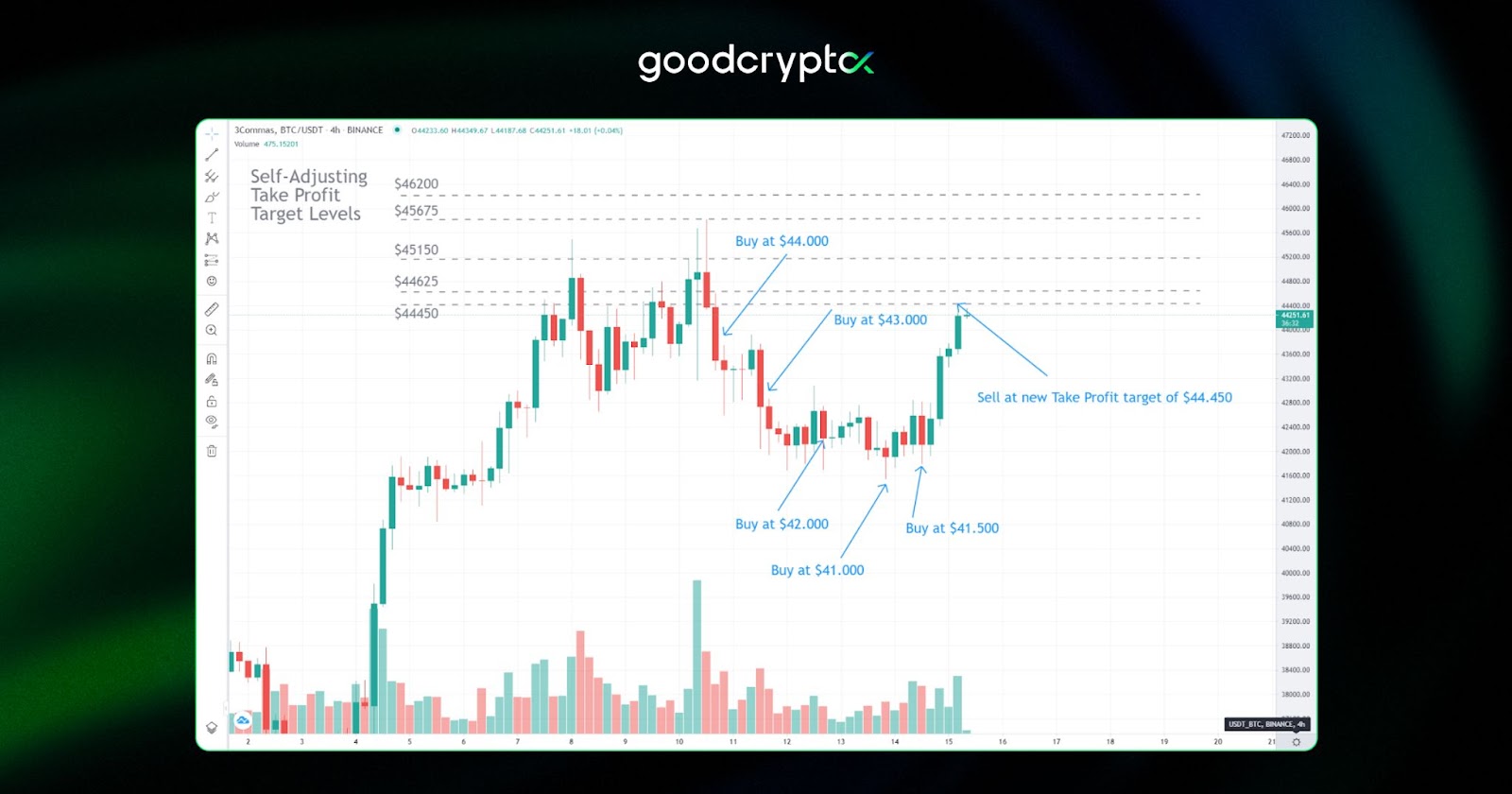

In the above example, you can see how the DCA bot can make 5% profits in a swing trend. The initial take profit target would have been $46.200. However, by averaging the price through multiple buy-ins, the bot was allowed to exit with a 5% profit at $44.450.
how to set up 3Commas DCA bot?
Usually, the initial method on how to use 3commas bots will be the creation of a dollar-cost average (DCA) bot. The process for the 3commas DCA bot setup can range from very simple to significantly advanced. There are generally two main approaches on how to use 3Commas bot for DCA:
- Easy – choose an already-established 3Commas strategy and copy it to the letter.
- Hard – choose to create one yourself, which requires good general knowledge of trading indicators and signals.
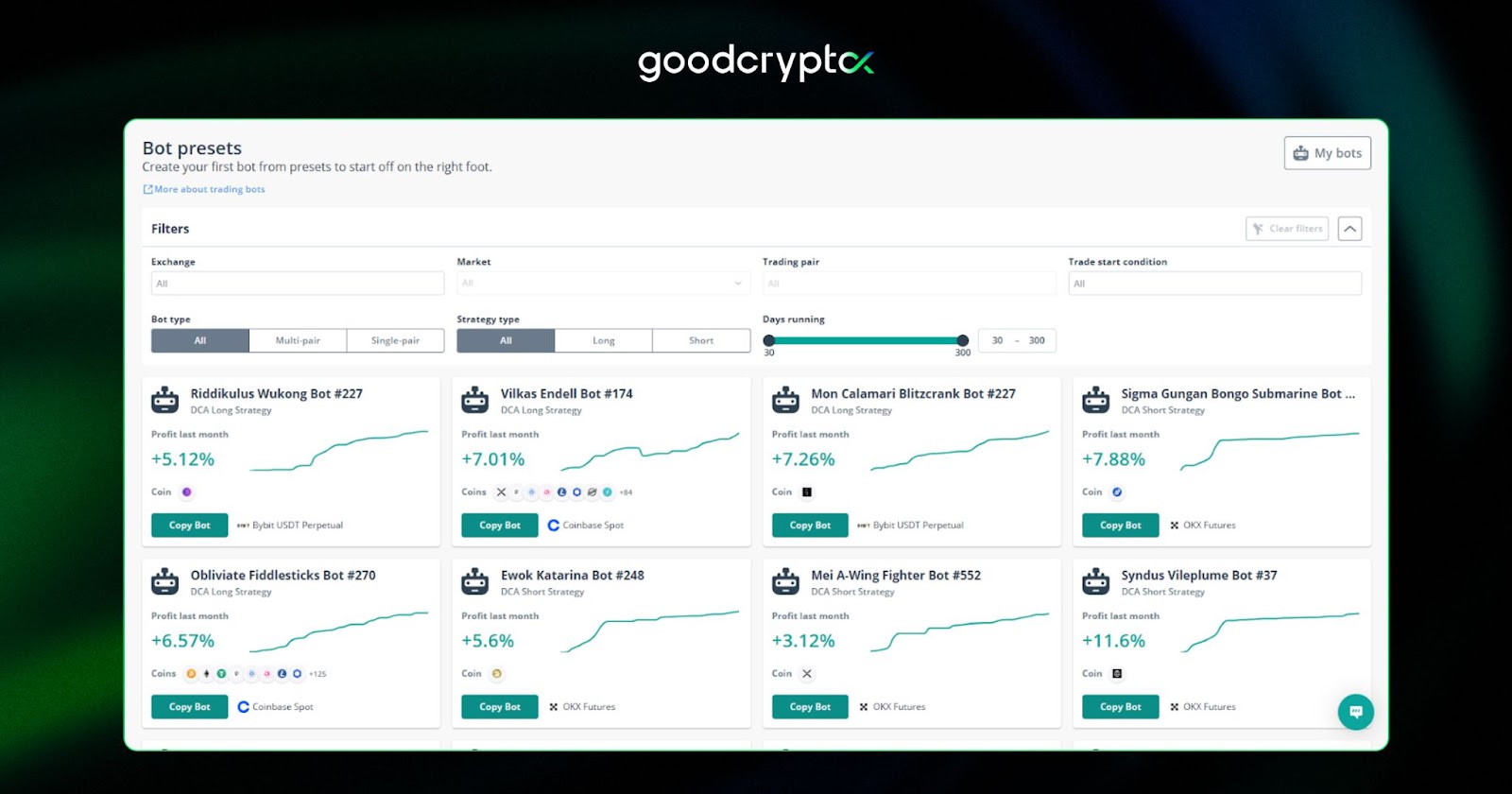
Moreover, you can also modify existing DCA bots to better fit your general risk appetite.
how to use 3Commas DCA bot in your trading strategy?
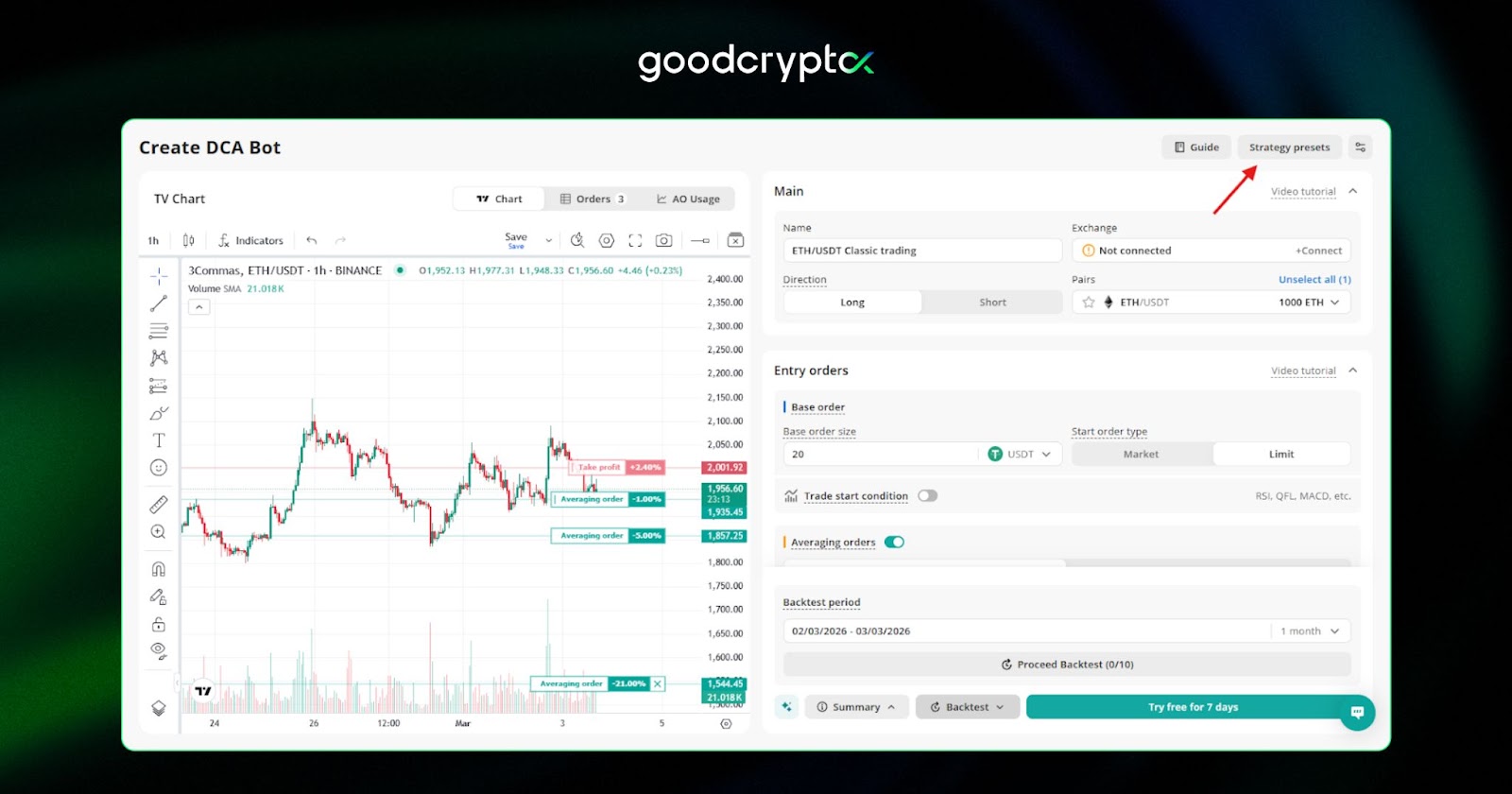
One of the standout 3Commas DCA bot features is its flexibility in deployment. When creating a 3Commas strategy and configuring your 3Commas DCA bot settings, you have three options at your disposal:
- Classic Trading is a solid starting point for spot exchange traders focused on Long positions. It works best in a rising market and comes pre-configured with sensible defaults, making it ideal if you want a reliable setup out of the box.
- Super Power is designed for Long trading on the Futures market, with the ability to set leverage up to x125. This preset suits traders who want to amplify their exposure while still benefiting from DCA averaging logic to manage volatility.
- Super Speed mirrors Super Power but is built for Short trading on Futures, making it the go-to choice for aggressive traders looking to profit during a descending market. Its three averaging orders help cushion against volatility along the way.
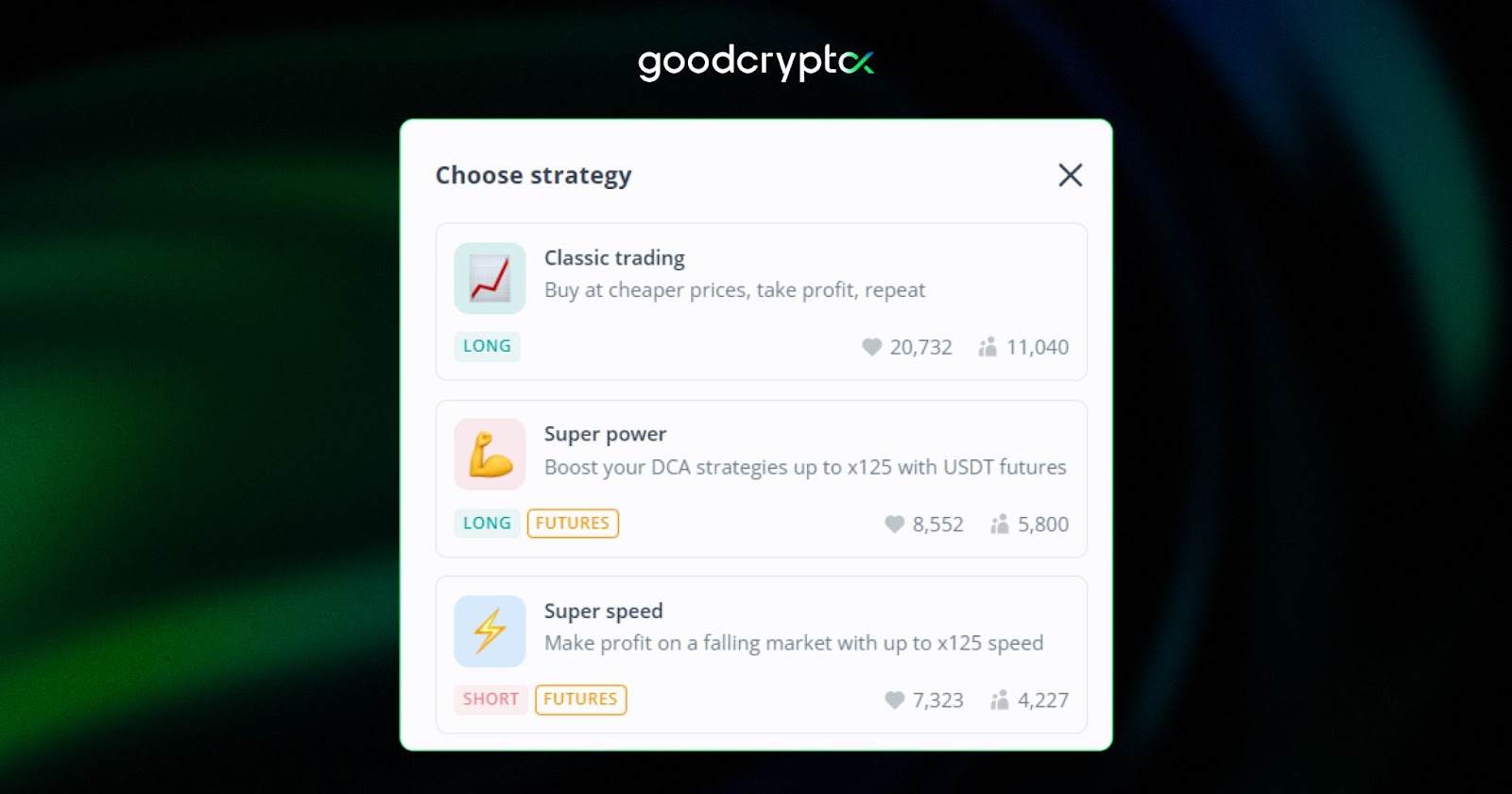
In case you want to fine-tune beyond these presets, you can adjust each setting manually to match your own 3Commas strategies and risk appetite. Conversely, if you just want to jump in and start trading, any of the three presets can be activated in the DCA creation form by clicking the “Strategy presets” button in the top right corner of the page.
3Commas TradingView bot: customize your trading strategy
Another neat feature of the 3 commas crypto platform is that you can control your DCA bots using signals set up in TradingView. Users who are already familiar with TradingView charts, indicators, and TradingView alerts can put this knowledge to good use.
In fact, if you know how to create alerts on TradingView, you are actually very close to creating your own TradingView 3commas bot. The main advantage of this feature is that you can use an advanced 3commas strategy TradingView that isn’t included in the bot creation wizard.
What makes this setup even more powerful is the ability to run a 3Commas TradingView webhook bot, which allows TradingView alerts to fire directly into 3Commas and trigger your bot automatically with no manual intervention needed.
3commas grid bot options
The next point in our 3Commas review is the 3Commas grid bot. This tool automates the buying and selling of assets based on a grid composed of buy and sell levels. Grid trading is most useful for cryptocurrencies that trend sideways and allow you to take frequent profits from their minimal movements.
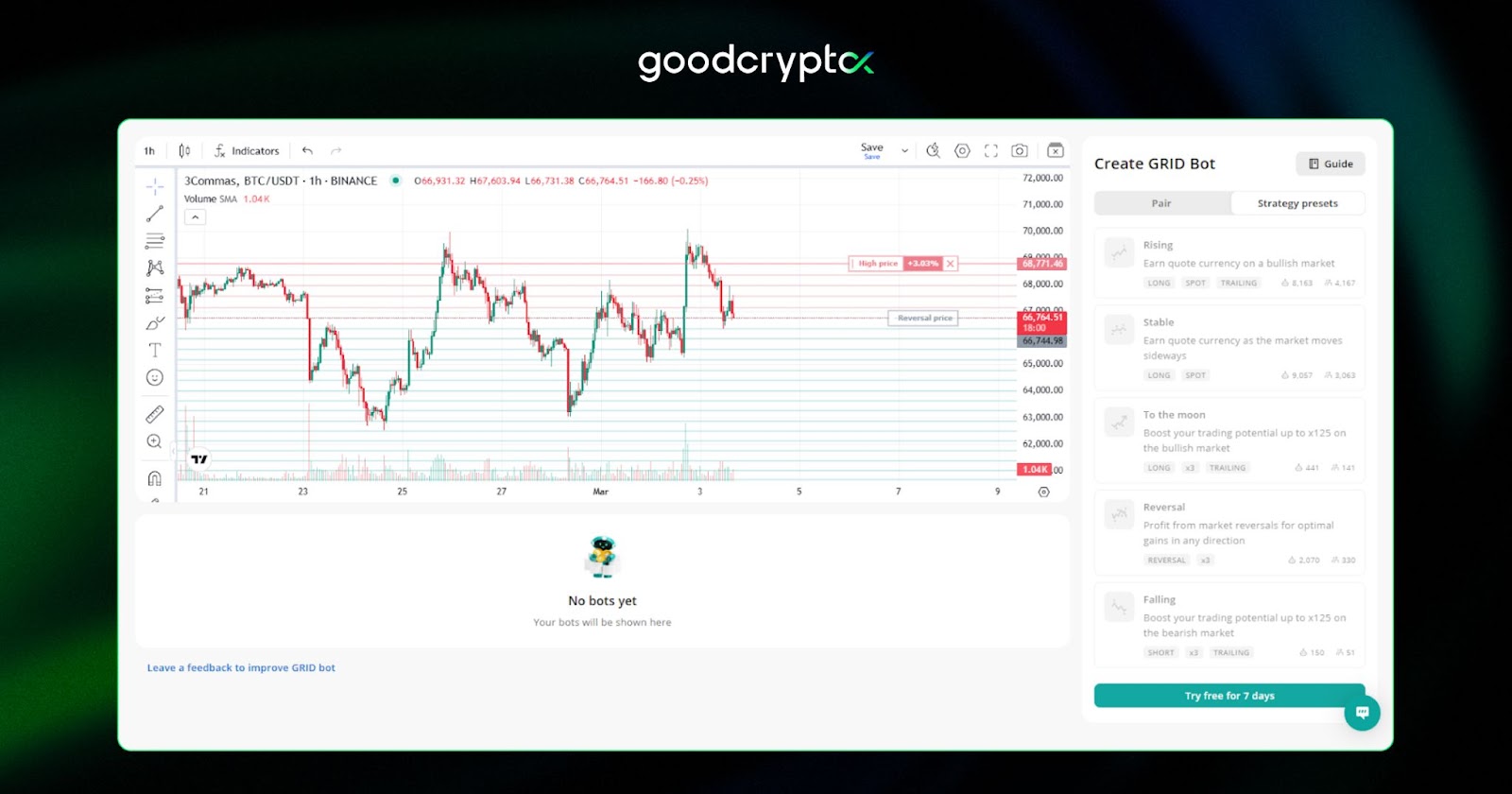
The 3Commas grid trading bot uses either an AI strategy or can be set up manually by the user.
To give our honest 3commas grid bot review, we can say that it’s one of the simplest bots to set up on the platform, as the gridbot requires very little technical analysis. The best grid trading bot can run unmonitored for weeks, raking in steady profits.
3Commas grid bot: how it works
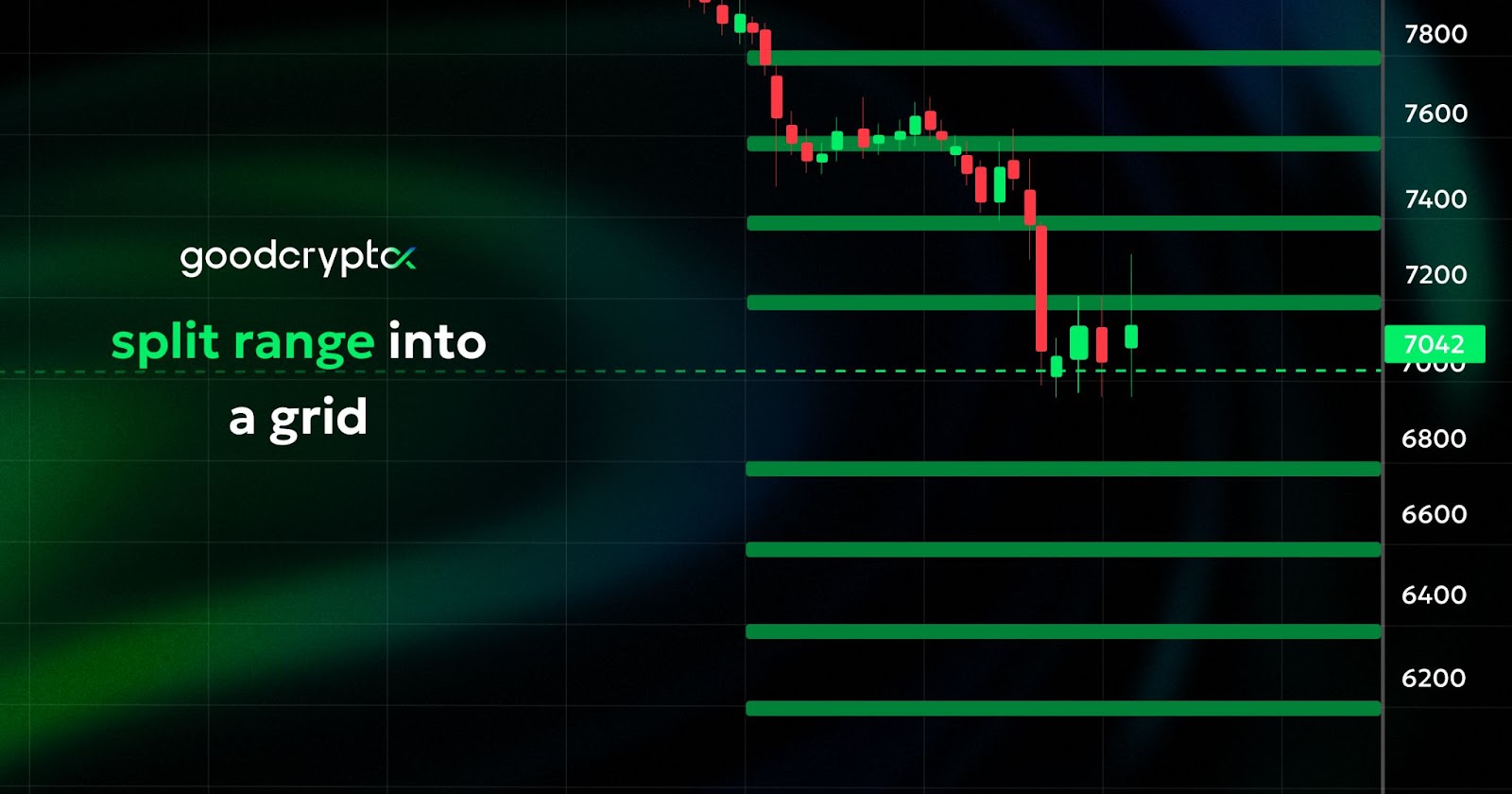
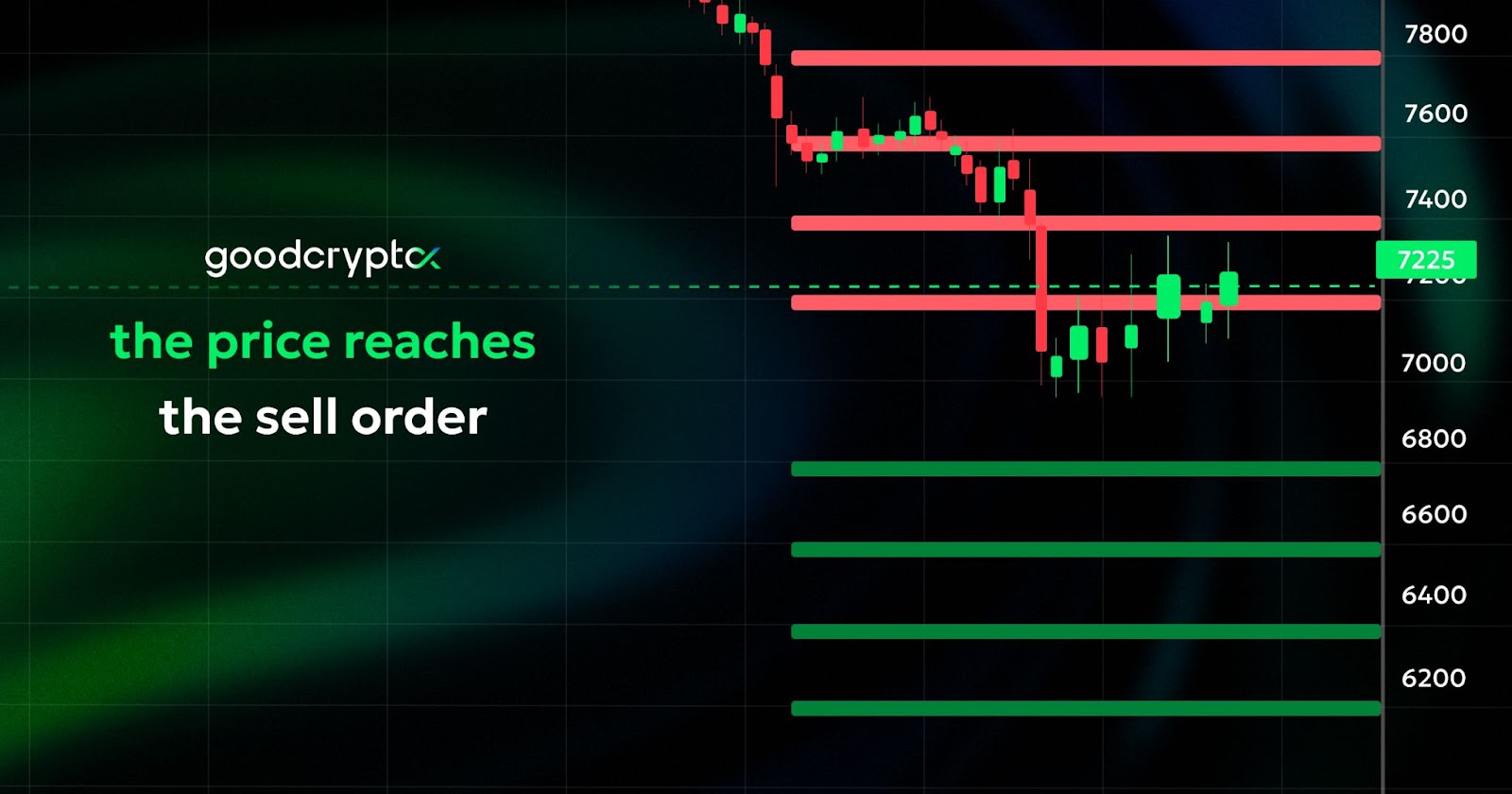
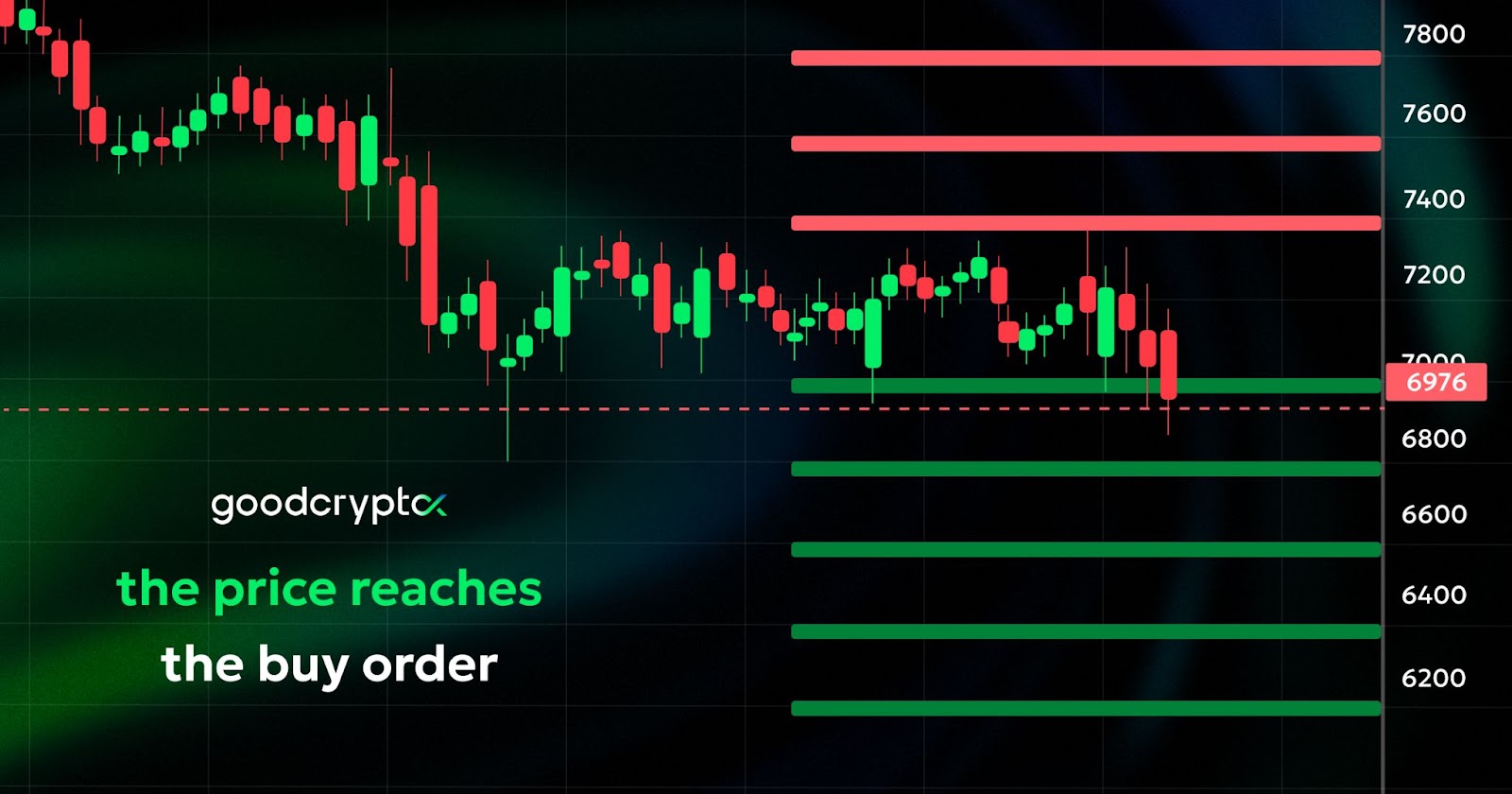
As we mentioned previously, the 3Commas grid bot works within a specified price range, making it ideal for turning a profit in a sideways market. But how does the 3Commas grid bot work exactly? Its goal is to capture minimal price movements by splitting this range into multiple grid levels. At each level, the bot places a buy or sell Limit Order, allowing you to buy or sell depending on the direction of the price.
Additionally, a grid bot allows you to methodically enter a position. For example, it enables you to set up a strategy and avoid buying an asset at the current level if you believe the price is too high or to buy an asset in small portions. The icing on the cake is that the grid bot will make a profit on price fluctuations while an asset’s price will be moving to the final desired entry level. The same works for exiting a position: when you want to sell an asset in portions while earning on the price fluctuations.
how to use 3Commas grid bot in your strategy?
To better understand how you can use the grid bot in your strategy, this 3Commas grid bot guide will illustrate it with a practical example.
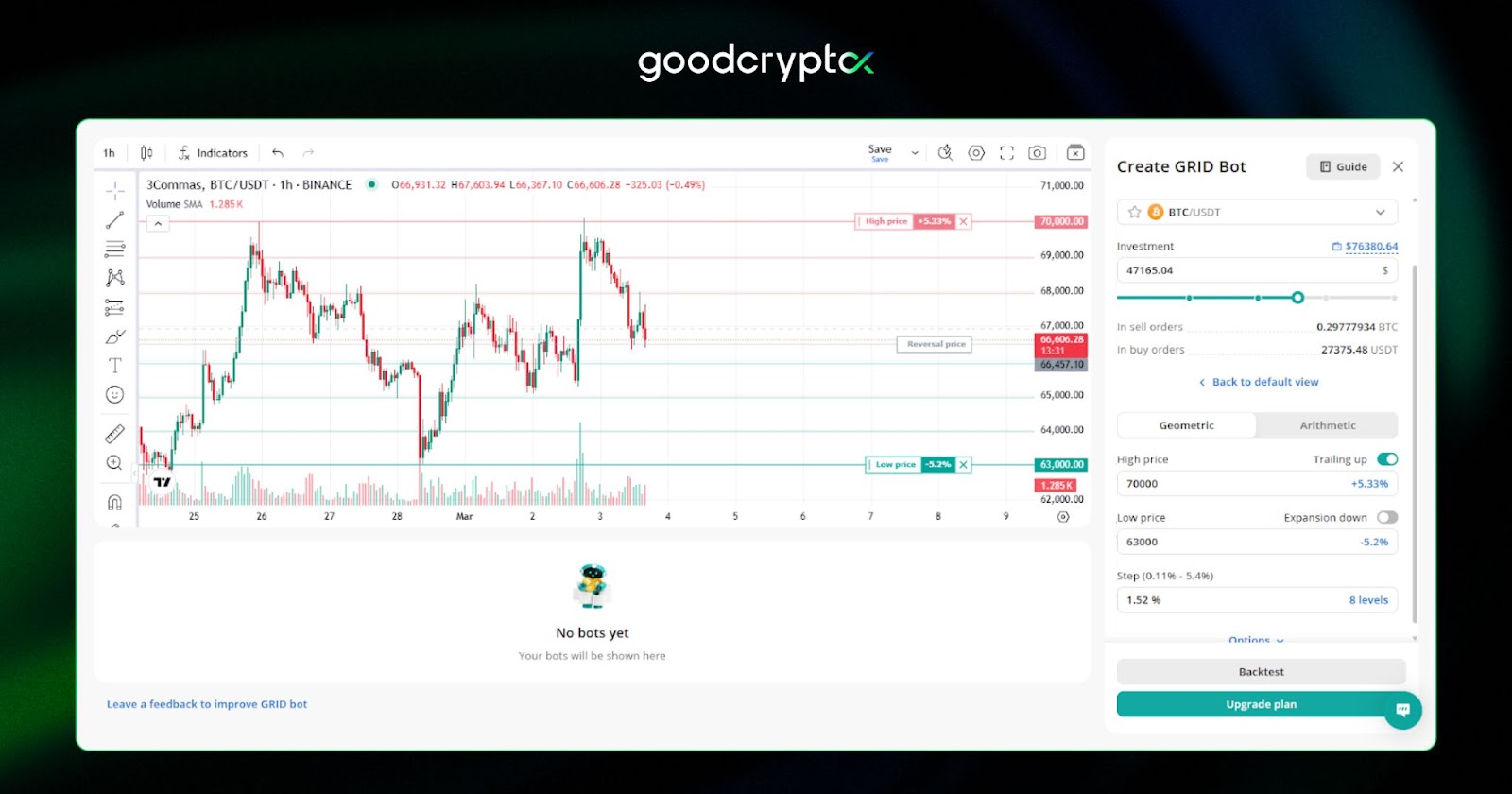
Let’s say that Bitcoin is trading within a range of $63.000 (lower limit) and $70.000 (upper limit). We divide this range into 8 price levels, where the bot will either buy or sell BTC. Two scenarios occur when a grid bot trades on your behalf:
- If the price goes up and crosses one of the “SELL” levels, the order is filled, and the grid bot sells BTC for profit. At this moment, the bot opens a new buy order one level lower.
- If the price goes down and crosses one of the “BUY” levels, the bot fills the limit buy order created earlier. At the same time, the bot creates a new sell order one level higher.
This buying, selling, and setting new orders carries on until either the top or bottom of the range is reached or the user stops the grid bot 3Commas manually. As any good 3Commas grid bot tutorial will tell you, you can also set up a manual stop loss above and below the grid – a key consideration when dialing in your 3Commas grid bot settings. This will allow the bot to run its course until either of these limits is reached.
3Commas signal bot: how it works
The 3Commas trading platform gives you the ability to incorporate external signals into your trading bots through the dedicated Signal Bot. Rather than relying on a third-party signal marketplace, you can now build and control your own signals, giving you far greater flexibility and independence over your trading strategy.
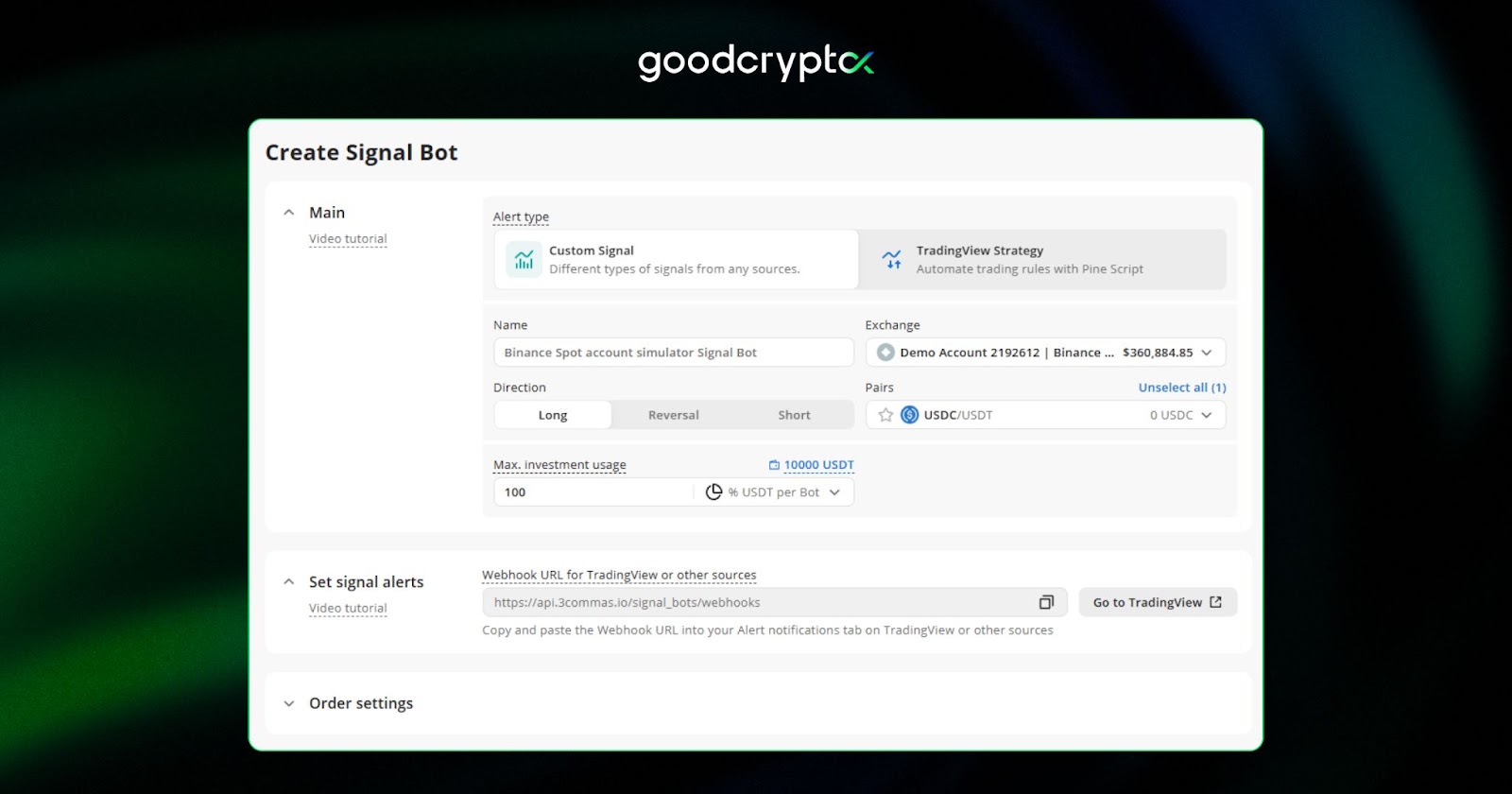
The Signal Bot 3Commas works by receiving alerts from TradingView via webhooks, which then trigger your bot to open or close positions automatically. If you already use TradingView indicators or have your own custom scripts and strategies set up, connecting them to a 3Commas Signal Bot is a natural next step, no third-party subscription required.
how to use 3Commas signal bot in your strategy?
To get started, you simply create a Signal Bot TradingView webhook in the 3Commas interface, copy the provided webhook URL, and paste it into your TradingView alert. From that point, every time your indicator fires an alert, the bot acts on it instantly. You retain full control over the bot’s settings, including take profit, stop loss, and position sizing, while the signal handles the timing of entries and exits.
This approach suits traders who want to run their own proven strategies at scale, automate indicator-based entries without manual execution, or build more advanced setups such as scalping or dynamic grid strategies on top of their own custom signals.
3Commas SmartTrade terminal
The 3Commas SmartTrade Terminal is the second-most important feature of the 3 commas crypto trading platform. So what is 3Commas Smart Trade? By using the SmartTrade feature, you can access a streamlined 3commas trading interface that allows you to place manual orders on your preferred crypto exchanges.
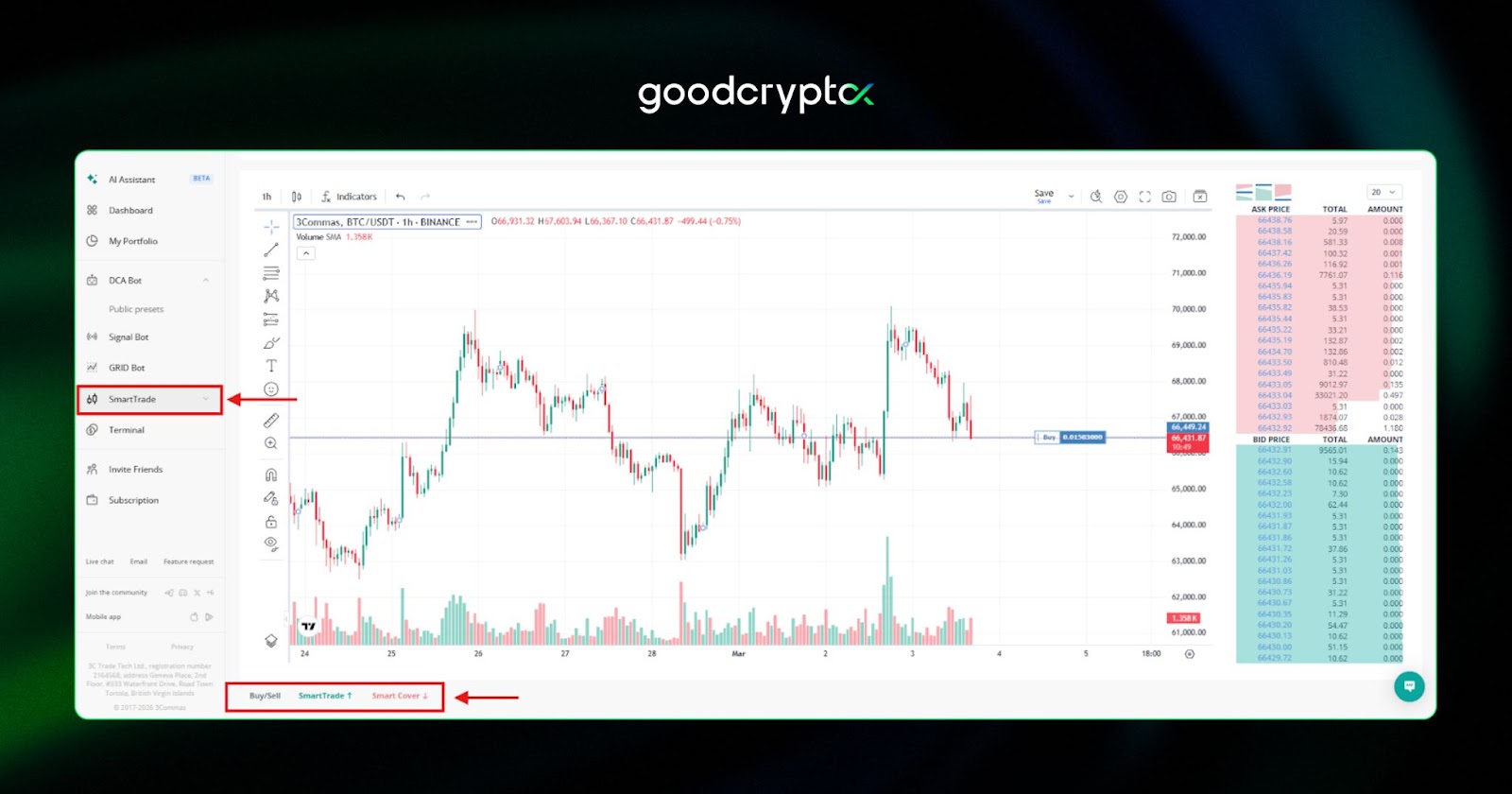
In addition to traditional orders, the smart trade 3commas offers some form of automation through 3 different tools. Here’s how to use 3Commas Smart Trade to its full potential:
- SmartTrade: allows you to buy and sell cryptos.
- Smart Cover allows you to increase your portfolio by selling crypto from your portfolio and rebuy at a lower price down the line.
- Buy/Sell: Just regular buying and selling.
All of these are supported by the 3commas smart trade take profit feature which includes a trailing stop. This means that 3 Commas will continue holding the position open even if the take profit target is reached, as long as the price goes up. Once the price starts to fall under a certain percentage set by the user, the smart trade feature will close the position. Consequently, 3commas SmartTrade allows you to follow the price movement to the top and take profit only when your trade reaches market exhaustion.
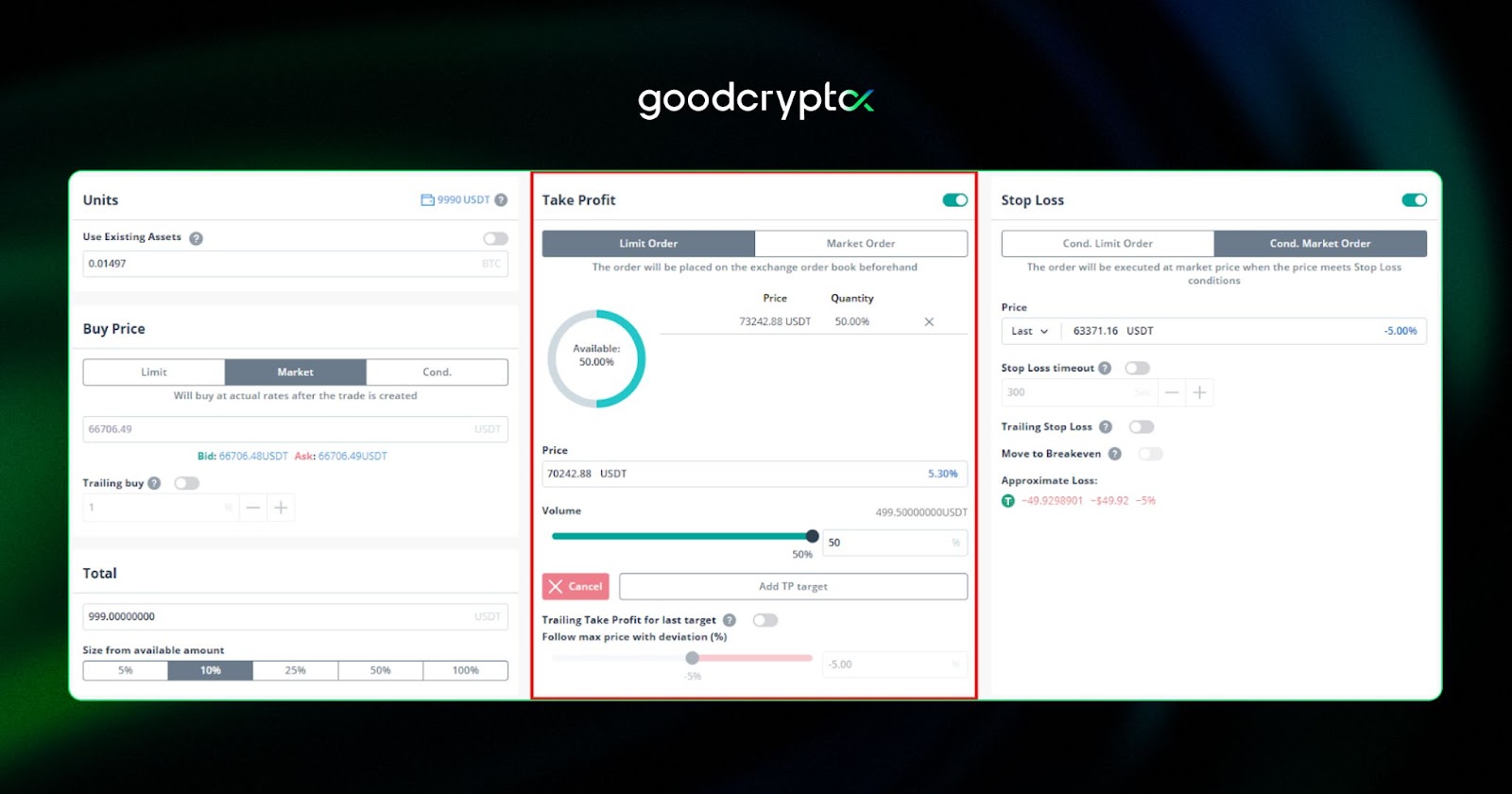
3Commas terminal
The 3commas trading terminal is similar to SmartTrade in every way, with the exception that it doesn’t provide price trailing. It’s handy for placing trades manually without having to juggle between multiple exchanges at once.
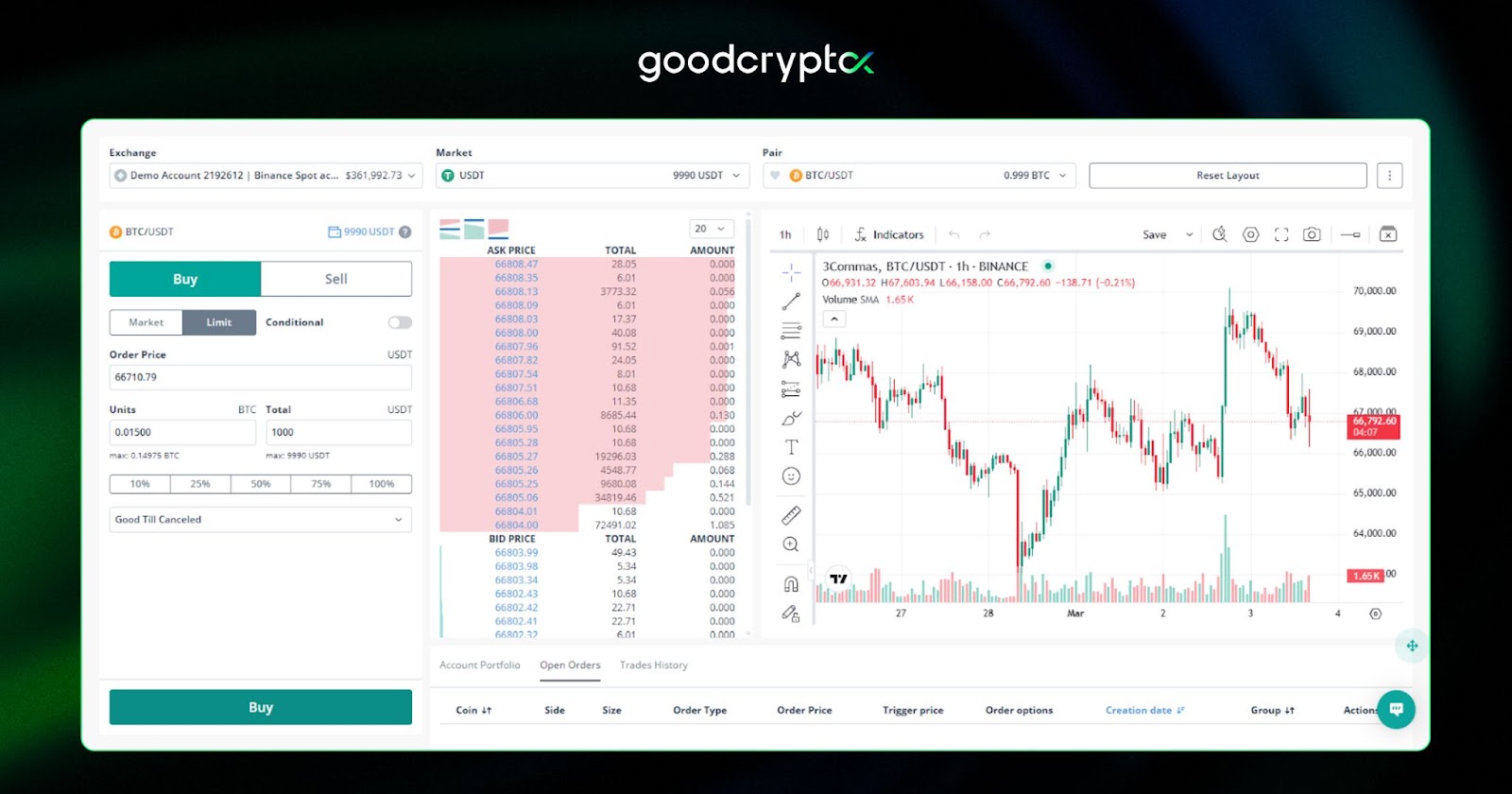
Traders who prefer short-term, high-frequency trading will particularly appreciate the 3Commas scalping terminal, which features a dedicated Scalping Widget designed for fast-moving trades. The 3Commas scalper terminal supports quick Long and Short positions with minimal input, and even includes keyboard shortcuts for faster execution, making the 3Commas scalping trading terminal a solid choice for those who need to act quickly on market moves.
3Commas backtesting tool overview
The 3Commas backtesting feature is a welcome addition to the platform and addresses what was previously a notable gap. Backtesting on 3Commas allows you to run your strategy against real historical data from over 10 supported spot and futures exchanges, covering more than 10,000 trading pairs – so you can see how your bot would have performed through bull runs, crashes, and sideways markets alike.
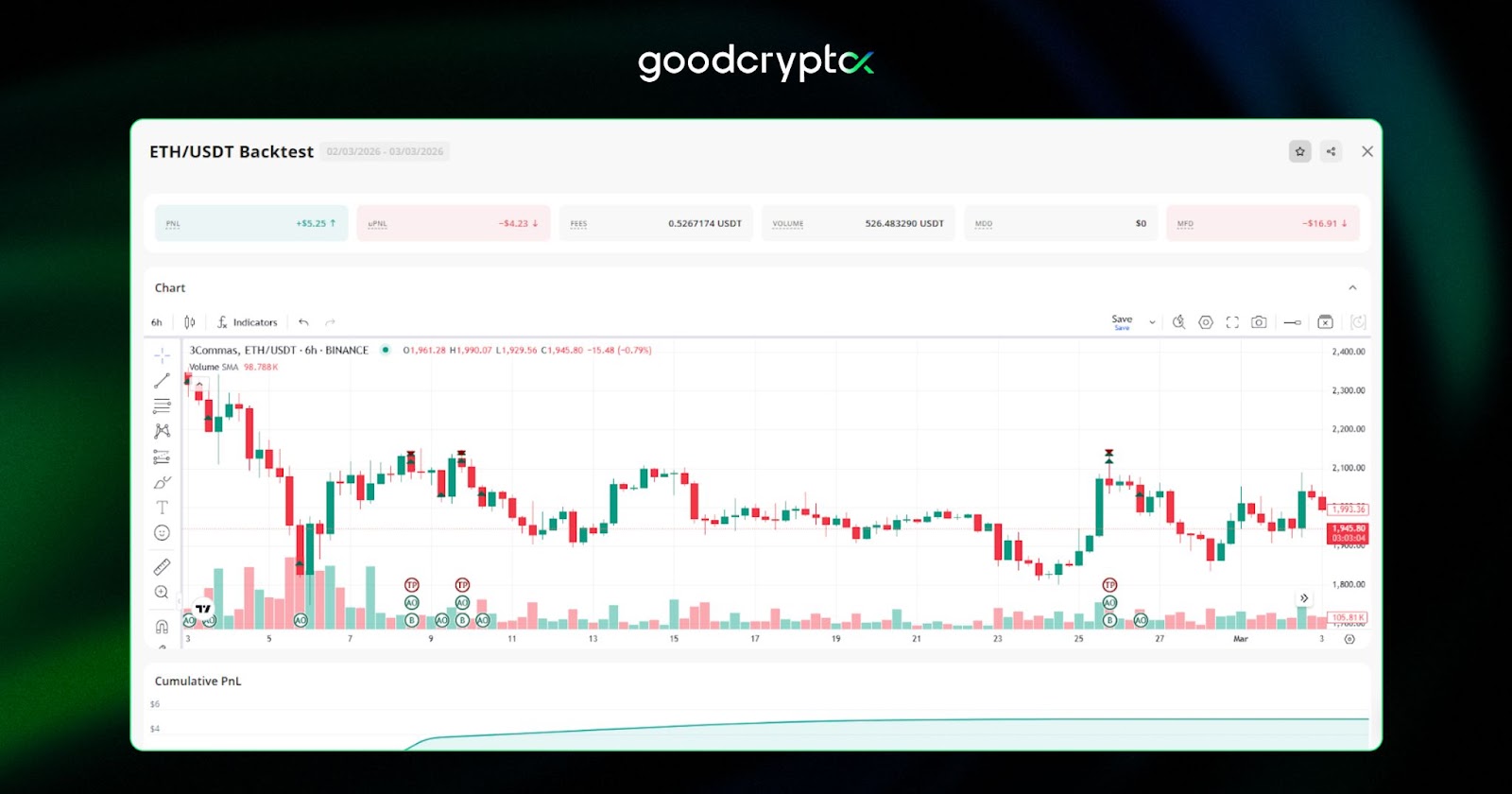
3Commas bot backtesting comes with a solid set of tools: built-in technical indicators, multi-pair analysis (test up to 10 pairs simultaneously), performance metrics like PnL and win rate, and risk management data including max drawdown and Sharpe ratio. For traders who rely on chart-based signals, 3Commas backtesting TradingView-style indicators are supported natively, making it easy to validate indicator-driven strategies before going live.
For those who prefer risk-free live testing over historical simulation, the Paper Trading mechanism is still available – letting you run your strategy in real-time market conditions without using real money. Between the two, you now have a well-rounded toolkit for validating any approach before committing real capital.
3Commas trading signals
A range of 3Commas signals that can be connected directly to automated bots – no manual order placement required. The platform supports several signal types, each suited to a different trading style and level of experience. In this section, we’ll take a closer look at three of the best 3Commas signals available: Premium CQS Signals, personal TradingView signals, and the built-in QFL signals, so you can find the 3Commas best signals option that fits your strategy.
premium CQS signals on 3Commas
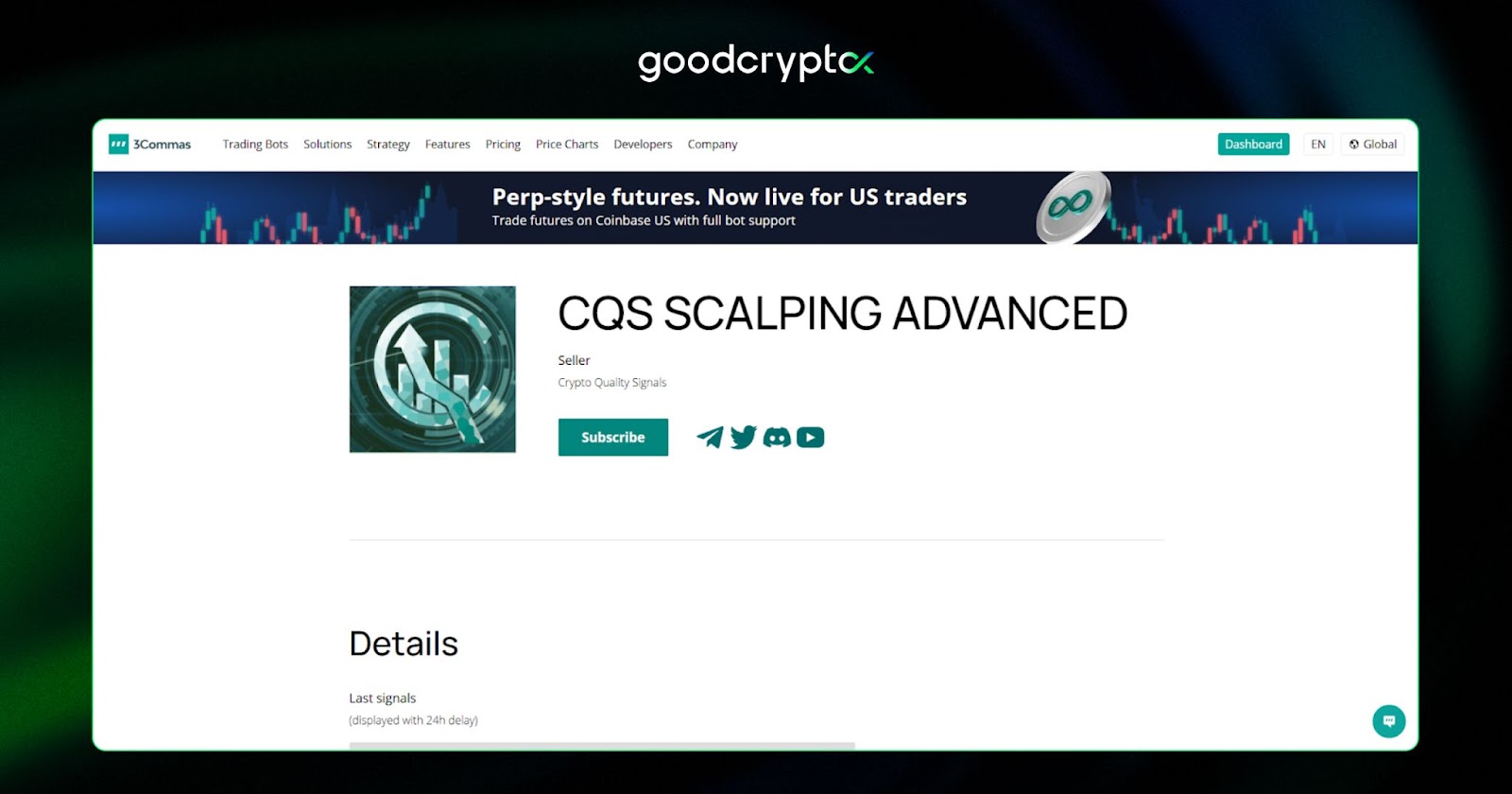
The Crypto Quality Signals or CQS on 3commas, is one of the most popular signal providers of the platform. Their 3commas CQS scalping signals strategy allows traders to accumulate profits through hundreds of small-profit trades.
personal 3Commas tradingview signals
Like we mentioned previously, you can set up your own 3commas TradingView custom signals by connecting the app with your Tradingview alerts. The major advantage is that your 3 commas Trading View signals can include advanced indicators (MACD, Fibonacci retracement, etc.) that are not available in the advanced bot creator.
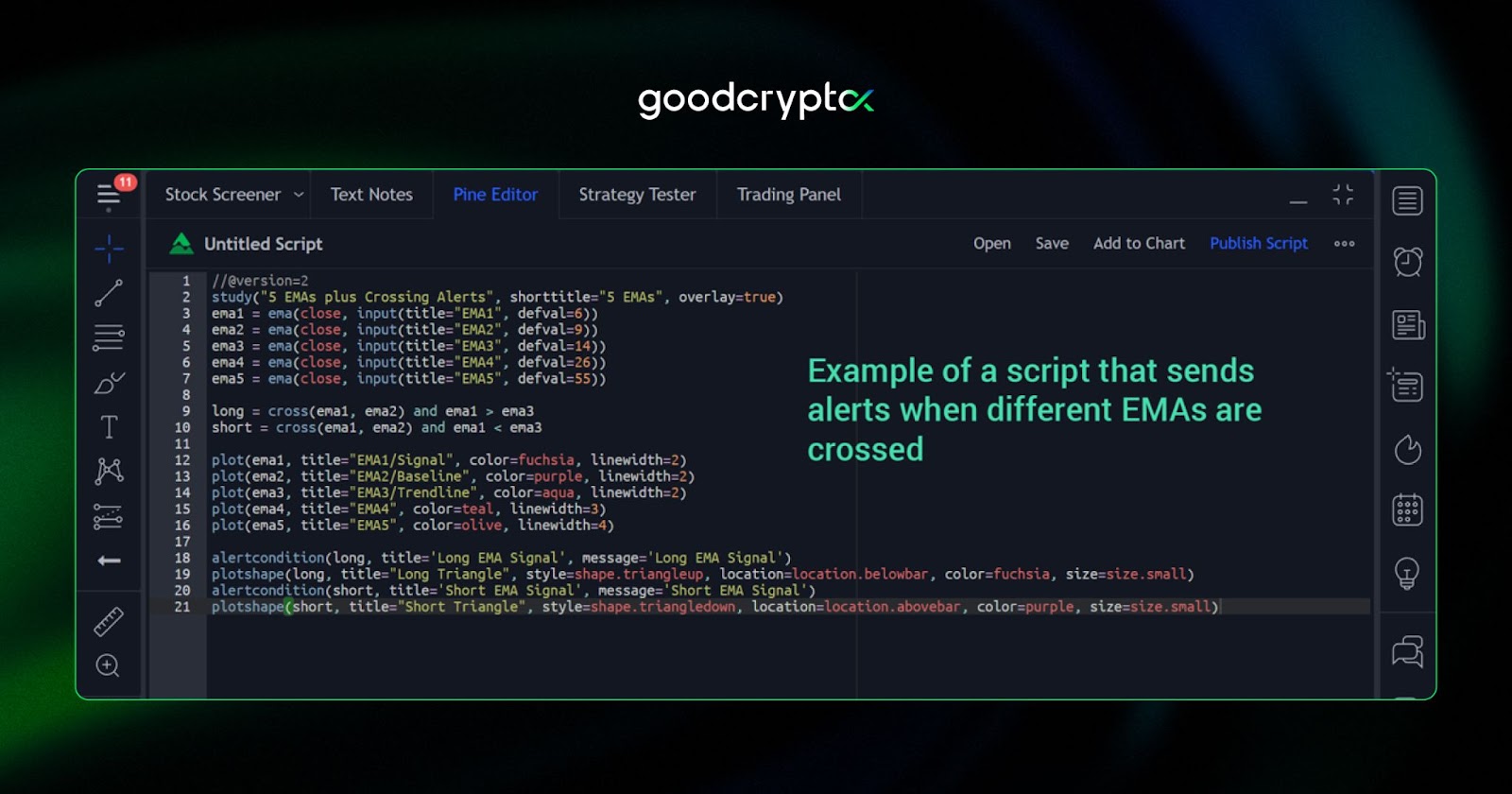
This is quite an advanced tool, as it requires that you configure your Tradingview account to send messages to 3Commas each time it generates an alert. It also requires extensive knowledge of Tradingview scripts and the usage of the Pine editor. If you wish to learn how to do this, check out the video.
what is 3Commas QFL signals?
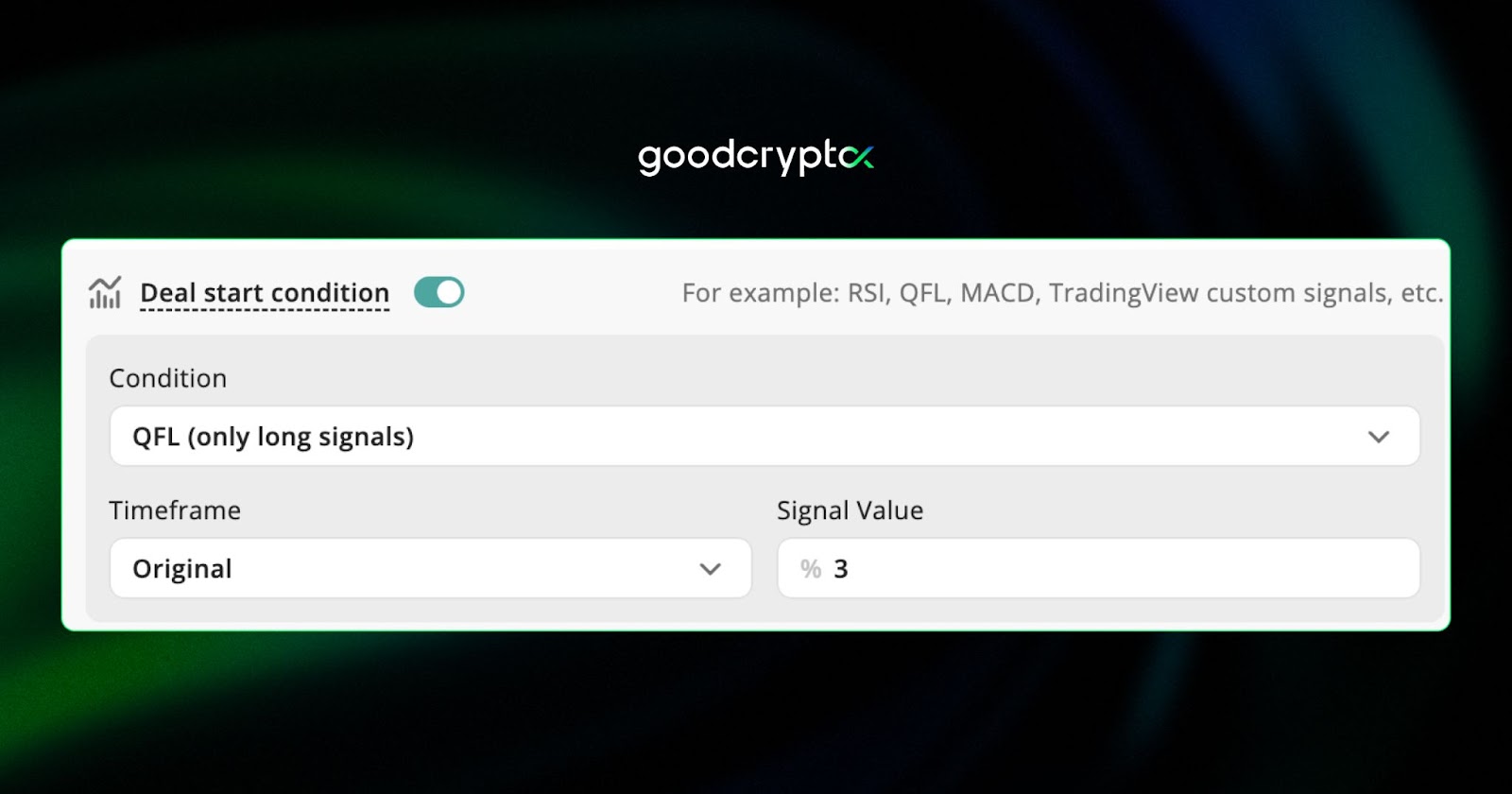
Finally, there’s the 3commas QFL, which stands for Quickfingers Luc. The QFL 3commas method for bots as buy signals attempts to find dead cat bounces and is best used for accumulating profits during a macro downtrend.
So how does the QFL method for bots as buy signals actually work? In short, the strategy identifies key price “bases” – support levels where an asset has previously bounced strongly. When the price crashes through one of these bases, the QFL signal on 3Commas triggers a buy order, anticipating a sharp rebound. This makes QFL signals on 3Commas particularly effective during periods of high volatility, where rapid dips and recoveries are common.
3Commas exchanges list
A crucial point in this 3Commas bot review is the 3commas supported exchanges coverage. So, what exchanges does 3commas work on?
Fortunately, 3Commas delivers exceptionally well on this front. It supports no less than 16 different centralized exchanges including:
| Binance | OKX | Bybit | Coinbase Advanced | KuCoin |
| Binance US | Gate | Kraken | Bitget | Bitfinex |
| HTX | Gemini | Binance TR | Bitstamp |
The 3Commas Binance partnership allows it to include all of the variations of the exchange, including its futures markets. Moreover, its terminal provides 3commas Bitfinex bots, as well as a ByBit 3Commas futures market. Worth noting is that the 3commas Coinbase partnership only covers the Coinbase Pro (GDAX) version of the US trading platform.
main 3Commas settings review
The 3Commas settings menu is quite straightforward. Here, you will be able to increase your security level and personalize the notifications of your bots, among other things.
Additionally, in the 3 commas settings, you can enable a lite mode to hide some of the more complicated features of the platform. This will enable 3commas simple bot settings, which will prevent you from tampering with the bots. This can be useful for beginners, as they won’t be able to modify the 3commas bot settings inadvertently, which could lead to bad trades.
Remember, the best 3commas bot settings for your needs will always depend on your trading skillset and understanding of the platform’s mechanics.
3Commas pricing: is it worth your money?
The 3Commas pricing page shows us 4 different plans:
- Starter ($20/mo) – the entry-level plan for spot trading on a single exchange, with 5 active DCA bots, 2 signal bots, and 2 grid bots. A solid starting point for beginners who want to automate basic strategies without a large commitment.
- Pro ($50/mo) – steps up to both spot and futures trading across 3 exchange accounts, with 20 active DCA bots, 20 signal bots, and 10 grid bots. Backtesting history extends to 2 years for DCA, making it well-suited for traders who want more room to grow.
- Expert ($140/mo) – the top-tier plan for serious and high-volume traders, offering 15 API keys and limits of up to 1,000 active bots across all bot types. Full DCA backtest history, Read & Write API access, and priority live chat support make this the go-to for professional or multi-account trading.
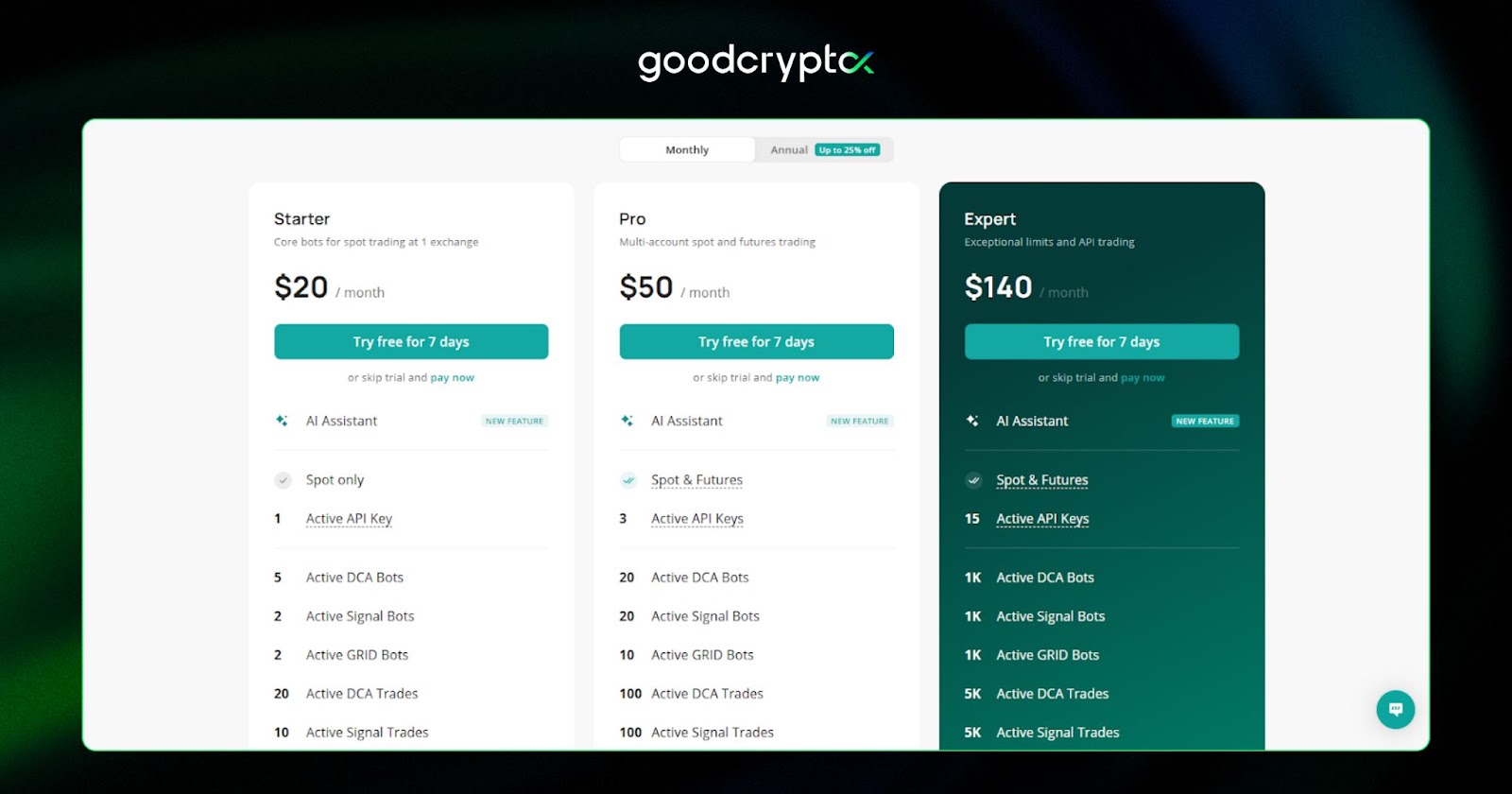
Note that the 3commas price does not include 3commas bot usage fees or the trading fees from the exchanges themselves. Fortunately, there’s no additional 3commas commission for the trades you will be executing through the platform.
is 3Commas safe to use?
Because it will trade on your behalf, asking yourself “Is 3commas safe to use?” is more than a reasonable question.
While some might have some 3commas trading security risks concerns, there’s no history of major hacks or security breaches. Moreover, it’s secured by multiple 2FA, including a Google Authenticator and an email code in case you switch IPs between logins. All of this lets us believe that 3Commas is quite safe to use.
the best 3Commas alternative
While there are dozens of bot platforms out there, Cryptohopper stands out as the most logical 3commas alternative. Both platforms provide similar features where users can either personalize their bot or purchase signals on a marketplace. The pricing of 3Commas vs Cryptohopper is also quite comparable.
However, if you are looking for free alternatives to 3commas for portfolio management, want to connect to more exchanges, or are looking for a mobile-first solution, you should look no further than our very own goodcryptoX app.
- goodcryptoX’s free version will allow you to manage your portfolio across more exchanges than 3Commas and allows monitoring of non-custodial wallets as well.
- Additionally, the paid plans of our app will allow you to access functions similar to 3Commas’ Smart trading like trailing stops, Grid and DCA trading, and many more, starting from $12.99/mo, compared to $20/mo for 3Commas.
- What truly sets goodcryptoX apart is its support for DeFi trading, including automated DCA bots running directly on decentralized exchanges. This means you can run the same powerful bot strategies you’d use on centralized exchanges, but in a fully non-custodial environment where you retain control of your funds at all times.
- Finally, you’ll get access to Smart Alerts of various types and the advanced DEX Screener with gem sniper bot, which helps crypto investors detect new coins with tremendous speculative potential based on TVL and Price Increase within a given period.
All in all, goodcryptoX is a mobile-first trading terminal that might be able to cover all of your dynamic trading needs for a fraction of the price of 3Commas.
conclusion
To conclude our 3Commas review, we can easily say that it’s one of the best automatic trading platforms currently available. It offers a huge amount of features and incredible bot personalization possibilities. However, this also results in a sometimes overly complex platform that can be quite daunting, even for experienced traders.
If you are intimidated by 3Commas, make sure you give our goodcryptoX app on iOS, Android,or Web a try before committing to a subscription. You might be able to find everything you need in a much more user-friendly and streamlined package altogether.